Configuration
Info styles
The eight layouts for the system information, what each shows, and what each costs.
The information beside the art comes in eight layouts. Pick one with
info_style or --info:
animfetch --pin --info boxedinfo_style = "boxed"Each style is shown as a screenshot, with colour and icons, and then as plain text: real output with the animation switched off and icons turned off, so it reads the same in any font. With icons on, the styles that have them draw a Nerd Font glyph beside each row.
| Style | Looks like |
|---|---|
classic (default) | user@host, a rule, then Label: value rows |
boxed | icons and short labels in a rounded box, values beside it |
tree | a user box over OS and PC groups, a tree of icons beside : value lines |
sections | Hardware, Software and Uptime / Age blocks under titled rules |
chips | SYSTEM, SOFTWARE and HARDWARE as filled, rounded pills with two-letter keys |
iconic | a bare coloured icon per row, no labels, under pill headings |
card | one rounded box, labels at the left edge and values at the right |
minimal | an icon and a value per row, nothing else |
classic#
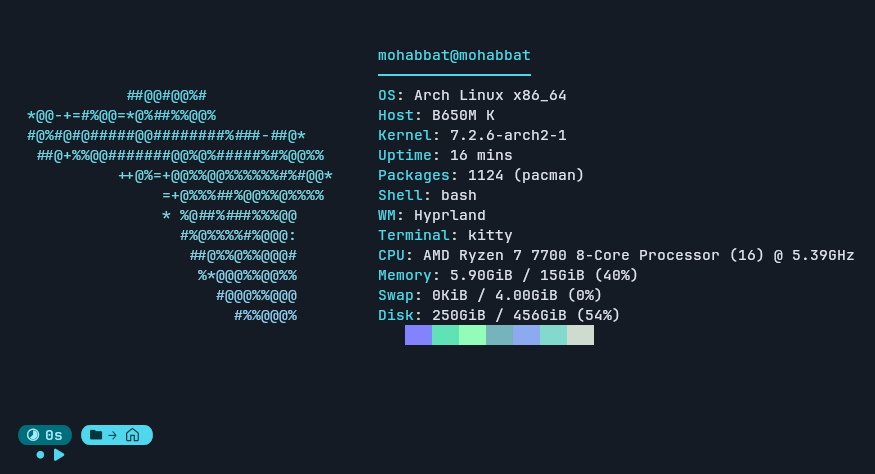
The default: a title, a rule, and one Label: value row per module. It reads nothing extra, so it is the cheapest.
lovelace@thinkpad
─────────────────
OS: Arch Linux x86_64
Host: B650M K
Kernel: 7.2.6-arch2-1
Uptime: 1 hour, 55 mins
Packages: 1126 (pacman)
Shell: bash
WM: Hyprland
Terminal: kitty
CPU: AMD Ryzen 7 7700 8-Core Processor (16) @ 5.39GHz
Memory: 8.63GiB / 15GiB (58%)
Swap: 0KiB / 4.00GiB (0%)
Disk: 248GiB / 456GiB (54%)boxed#
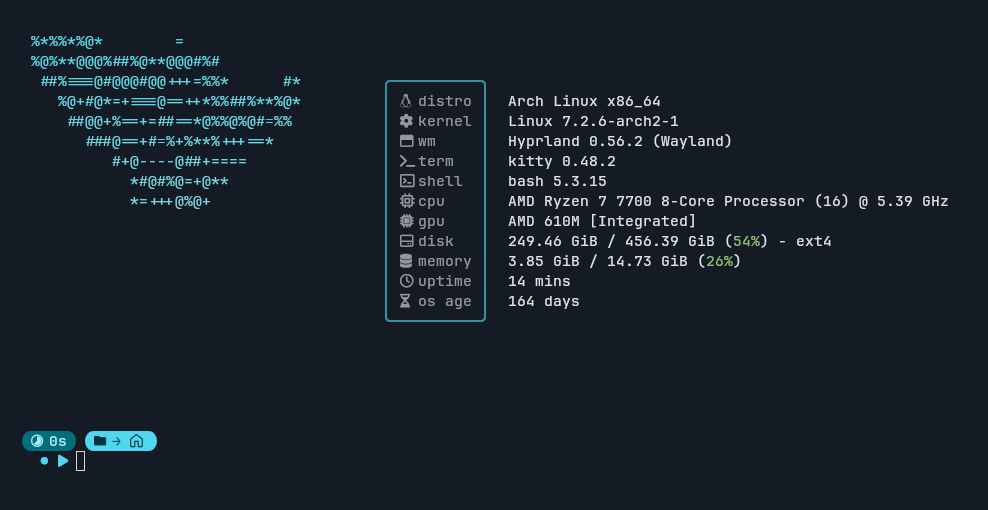
Short lowercase labels with icons in a rounded box, values beside it. It reads fuller values (the kernel's name, terminal, shell and window manager versions, the filesystem under disk), colours usage percentages by how full they are, and adds the gpu and os_age rows.
╭────────╮
│ distro │  Arch Linux x86_64
│ kernel │  Linux 7.2.6-arch2-1
│ wm     │  Hyprland 0.56.2 (Wayland)
│ term   │  kitty 0.48.2
│ shell  │  bash 5.3.15
│ cpu    │  AMD Ryzen 7 7700 8-Core Processor (16) @ 5.39 GHz
│ gpu    │  AMD 610M [Integrated]
│ disk   │  248.37 GiB / 456.39 GiB (54%) - ext4
│ memory │  8.63 GiB / 14.73 GiB (58%)
│ uptime │  1 hour, 55 mins
│ os age │  163 days
╰────────╯tree#
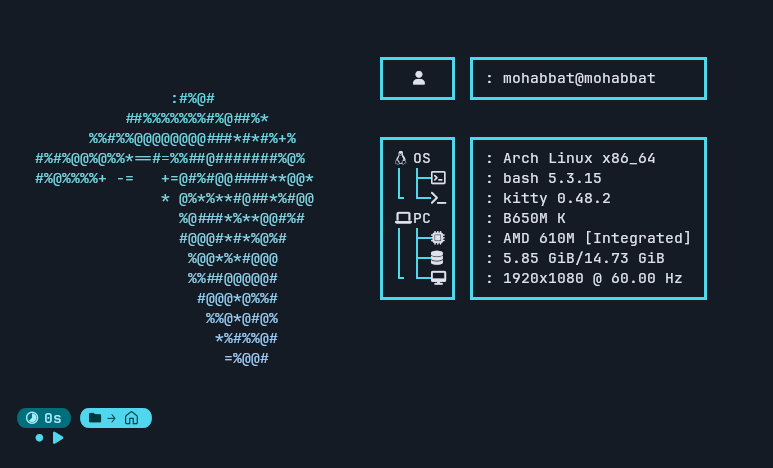
A user box over two groups, OS and PC, each a tree of icons beside a column of : value lines. It draws a fixed set of rows: os, shell and terminal under OS; host (or cpu, if the firmware gives no host name), gpu, memory and display under PC. Other modules are not shown in it.
┏━━━━━━━━━━━┓ ┏━━━━━━━━━━━━━━━━━━━━━━━━━┓
┃   user    ┃ ┃ : lovelace@thinkpad     ┃
┗━━━━━━━━━━━┛ ┗━━━━━━━━━━━━━━━━━━━━━━━━━┛

┏━━━━━━━━━━━┓ ┏━━━━━━━━━━━━━━━━━━━━━━━━━┓
┃ OS        ┃ ┃ : Arch Linux x86_64     ┃
┃ │ ├─shell ┃ ┃ : bash 5.3.15           ┃
┃ └ └─term  ┃ ┃ : kitty 0.48.2          ┃
┃ PC        ┃ ┃ : B650M K               ┃
┃ │ ├─gpu   ┃ ┃ : AMD 610M [Integrated] ┃
┃ │ ├─mem   ┃ ┃ : 8.63 GiB/14.73 GiB    ┃
┃ └ └─disp  ┃ ┃ : 1920x1080 @ 60.00 Hz  ┃
┗━━━━━━━━━━━┛ ┗━━━━━━━━━━━━━━━━━━━━━━━━━┛sections#
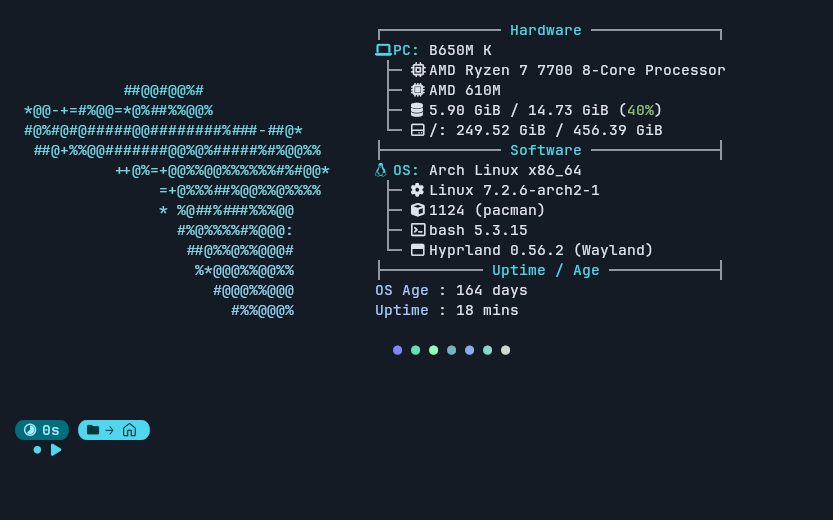
Titled blocks separated by rules, with the colours as dots below. Three fixed blocks: Hardware (host, cpu, gpu, memory, and every local disk), Software (os, kernel, packages, shell, wm) and Uptime / Age (os_age, uptime, and each battery). The CPU and GPU are bare model names. The section keys take the far end of the gradient as their colour, so they follow a palette too.
┌─────────────── Hardware ───────────────┐
PC: B650M K
 ├─ cpu  AMD Ryzen 7 7700 8-Core Processor
 ├─ gpu  AMD 610M
 ├─ mem  8.63 GiB / 14.73 GiB (58%)
 └─ disk /: 248.37 GiB / 456.39 GiB
├─────────────── Software ───────────────┤
OS: Arch Linux x86_64
 ├─ kernel Linux 7.2.6-arch2-1
 ├─ pkgs   1126 (pacman)
 ├─ shell  bash 5.3.15
 └─ wm     Hyprland 0.56.2 (Wayland)
├───────────── Uptime / Age ─────────────┤
OS Age : 163 days
Uptime : 1 hour, 55 minschips#
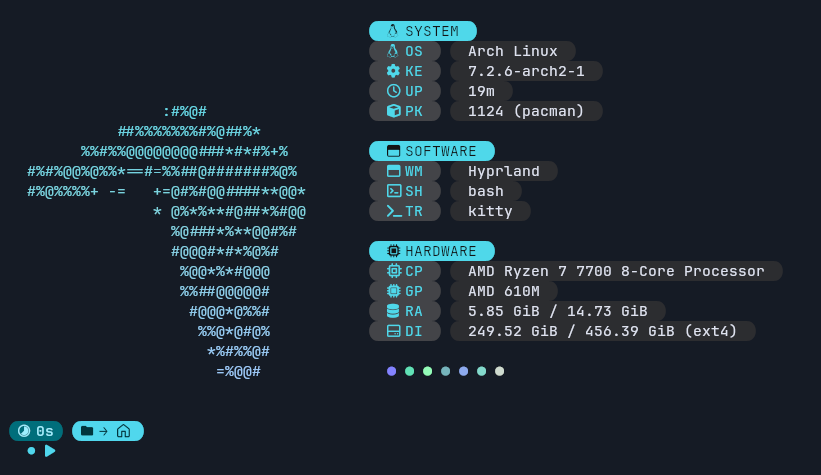
Filled, rounded pills: a heading chip per section, a two-letter key chip and a value chip per row. Headings are filled with your accent; chips are your value colour darkened, so it follows a palette. The rounded ends are Powerline glyphs and need both icons and colour; without either the chips are square. Three fixed blocks, with short bare values: no versions, no percentages. Its font row comes from GTK's settings.ini, so a machine with no GTK settings file shows none.
 SYSTEM
 OS   Arch Linux
 KE   7.2.6-arch2-1
 UP   1h 55m
 PK   1126 (pacman)

 SOFTWARE
 WM   Hyprland
 SH   bash
 TR   kitty

 HARDWARE
 CP   AMD Ryzen 7 7700 8-Core Processor
 GP   AMD 610M
 RA   8.64 GiB / 14.73 GiB
DI 248.37 GiB / 456.39 GiB (ext4)iconic#
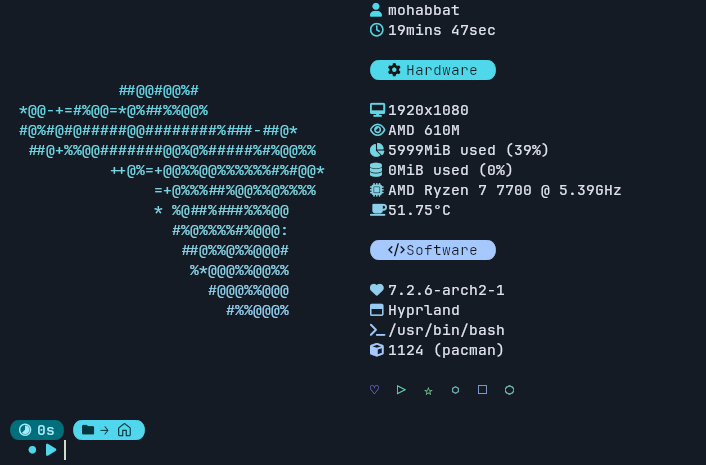
A bare coloured icon per row and no labels, under pill headings, with a row of outline shapes below. Icons are coloured along your gradient, one after another, and the headings are filled from it. It shows only the user's name (no host) and says uptime to the second. Two fixed blocks: Hardware (display, gpu, memory, swap, cpu, temperature) and Software (kernel, wm, shell_path, packages). With icons = false each row carries a short name instead, since the icon was the label. The temperature row needs a hwmon chip that reports the CPU (k10temp, coretemp); without one the row is skipped.
user   lovelace
up     1hours 55mins 23sec

 Hardware

disp   1920x1080
gpu    AMD 610M
mem    8842MiB used (58%)
swap   0MiB used (0%)
cpu    AMD Ryzen 7 7700 @ 5.39GHz
temp   48.25°C

 Software

kernel 7.2.6-arch2-1
wm     Hyprland
shell  /usr/bin/bash
pkgs 1126 (pacman)card#
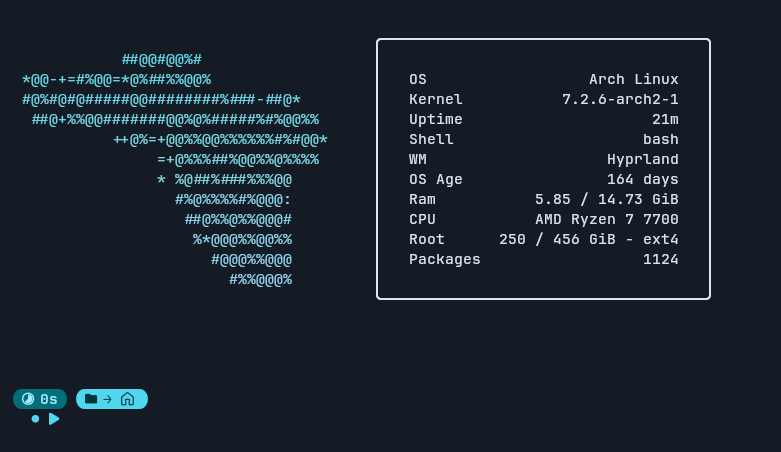
One rounded box with each label at the left edge and its value at the right, then a line of your own text (footer). Rows go in the order of modules, so it is the style you shape yourself. Memory is Ram, and each disk is named for where it is mounted (/ is Root, /mnt/Jogos is Jogos). Values are short and bare, in a single colour: your value. It shows your custom rows and footer.
╭────────────────────────────────────╮
│                                    │
│   OS                  Arch Linux   │
│   Kernel           7.2.6-arch2-1   │
│   Uptime                  1h 55m   │
│   Shell                     bash   │
│   WM                    Hyprland   │
│   OS Age                163 days   │
│   Ram           8.64 / 14.73 GiB   │
│   CPU           AMD Ryzen 7 7700   │
│   Root      248 / 456 GiB - ext4   │
│   Packages                  1126   │
│                                    │
╰────────────────────────────────────╯info_style = "card"
footer = "we are free!"
modules = ["os", "kernel", "memory", "cpu", "custom"]minimal#
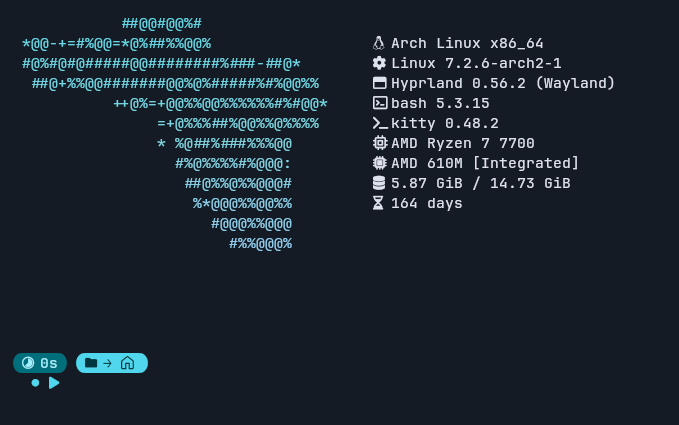
An icon and a value per row and nothing else: no title, no labels, no frame, one colour. It is the plain list that sits beside a border ornament. Rows go in the order of modules. Values are the fuller ones (versions, the session), since with no labels the value has to say what it is. Shown here with icons = false, where each row carries a short name; with icons on, an icon takes its place.
os     Arch Linux x86_64
kernel Linux 7.2.6-arch2-1
wm     Hyprland 0.56.2 (Wayland)
shell  bash 5.3.15
term   kitty 0.48.2
cpu    AMD Ryzen 7 7700
gpu    AMD 610M [Integrated]
mem    8.64 GiB / 14.73 GiB
age    163 days
What each one costs#
Most styles read nothing beyond what classic does. Three read fuller
values, which means running the shell and window manager to ask their
versions. That costs a few milliseconds (about 7 ms on a typical machine), paid
once at startup:
| Reads fuller values | Reads nothing extra |
|---|---|
boxed, tree, sections, minimal | classic, chips, iconic, card |
A terminal's version comes from its environment where it sets one, and from
--version for kitty, alacritty and foot, which are the ones known to answer.
Notes#
- The
displayrow reads each screen's current mode from the kernel, so it needs access to/dev/dri, which a plain SSH session lacks; the row is skipped there. - Icons are Nerd Font glyphs. If you see empty boxes, set
icons = falseor install a Nerd Font. - Leave
modulesunset to get each style's own rows, or set it to choose your own; see Modules.